Mon–Sun 8am–8pm Same-day service · Flat-rate pricing

TV LED Backlight Installation — Bias Lighting Behind Your TV

An LED strip behind the TV throws soft light onto the wall behind it — easier on the eyes in a dark room, better perceived contrast, and a clean glow that makes a wall-mounted TV look finished. We fit it, power it so it turns on with the TV, and hide every wire.

Why homeowners book us

  • $59 — strip fitted, powered and set up
  • Switches with the TV via its USB port or a smart plug
  • Accurate white (D65) for movies, or any color you like
  • Wires hidden behind the screen
  • Same-day, added to your TV installation
Call (877) 676-8880
★★★★★ 4.9★ from 480+ reviews 3-year workmanship warranty Crews in 12 US metros

Submit a request

Tell us about your TV and the wall — we'll confirm the exact price and a time that works for you by text or call.

What you get

What LED backlight installation includes

Bias lighting is a small upgrade with a big effect — if the strip is placed and powered properly.

Strip fitted to the TV

The LED strip is measured and fixed to the back of the TV, inset from the edges so the light spreads evenly onto the wall.

Turns on with the TV

Powered from the TV's USB port where it's switched, or from a smart plug — no separate remote to hunt for.

Color and brightness set

Set to D65 neutral white for accurate picture, or to the colors and scenes you like with the strip's app.

No visible wiring

The strip's cable and controller are hidden behind the TV, with the power run alongside the TV's cables.

Clean install, 3-year warranty

Adhesive surfaces cleaned first, clips where needed, and the installation covered for three years.

In this article
  1. What TV backlighting does
  2. Placement: why it's worth doing right
  3. Power: the detail that makes it convenient
  4. Color and brightness
  5. Pair it with the rest of the setup
  6. LED backlight installation in our regions

What TV backlighting does

A bright screen on a dark wall is hard on the eyes. Your pupils keep adjusting between the picture and the darkness around it, and after a movie your eyes feel it. Bias lighting — a soft, even light on the wall behind the TV — gives your eyes a reference point, so the strain drops and blacks on the screen actually look deeper by comparison.

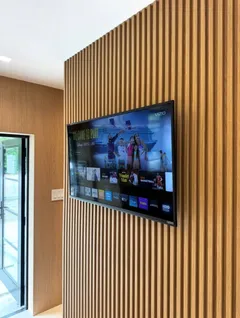
It also looks great. A wall-mounted TV with a gentle glow behind it looks finished, especially against wood slat panels — and it works behind a multi-screen media wall too. Our TV LED backlight installation fits the strip, powers it neatly and sets it up so it just works.

Placement: why it's worth doing right

An LED strip stuck right at the edges of the TV makes a harsh outline and hot spots. Stuck too far in, the light doesn't reach the wall evenly. We place the strip a couple of inches in from the edges, in one continuous run, with proper corner connectors or neat bends, so the wall gets a smooth halo rather than bright lines.

Wall-mounted TVs are ideal: the gap between the TV and the wall lets the light spread. A fixed mount gives a tight, even glow; a tilting or full-motion mount gives a wider, softer one.

Power: the detail that makes it convenient

The best setup is one you never think about: the lights come on with the TV and go off with it. Most TVs have a USB port that's only powered while the TV is on, and a USB-powered strip plugged into it does exactly that. Some TVs keep USB powered in standby; there, we use a smart plug or the strip's own auto-on feature.

Either way, the strip's controller and cable are tucked behind the TV, and any extra power runs with the TV's cables — see TV cable concealment.

Rather have a pro do it?

Send a request — we'll confirm the exact price and a time that suits you by text or call. 3-year warranty on every install.

Call (877) 676-8880

Color and brightness

For film and accurate color, the reference is neutral white near D65 (around 6500 K), set to roughly 10% of the screen's brightness. That's what we set by default. If you want color — to match the room, for gaming, or strips that follow what's on screen — we'll set that up in the strip's app instead.

Pair it with the rest of the setup

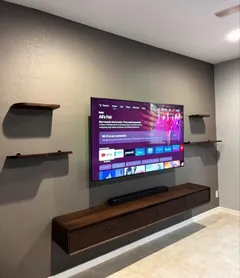
LED backlighting is a natural add-on to the same visit as a TV wall mounting, a soundbar or a floating shelf. If you have a Samsung The Frame, a soft backlight completes the gallery look — see Frame TV installation.

LED backlight installation in our regions

We install TV backlighting in Miami, Los Angeles, Dallas, Las Vegas, Houston, Atlanta, Chicago, San Diego, Charlotte, Salt Lake City, Seattle and Raleigh–Durham, with same-day slots and the same price everywhere.
How it works

How we install TV backlighting

  1. Step 1

    Choose the strip

    Bring your own LED kit or ask us to recommend one for your TV size — USB-powered kits are the simplest.

  2. Step 2

    Measure and clean

    We measure the back of the TV, plan the strip path inset from the edges and clean the surface for adhesion.

  3. Step 3

    Fit the strip

    The strip goes on in one continuous run with corner connectors or neat bends, secured with clips where needed.

  4. Step 4

    Power and hide the controller

    The strip is powered from a switched USB port or smart plug, with the controller tucked behind the TV.

  5. Step 5

    Set the color

    We set neutral white or your preferred color and brightness, and check that it turns on and off with the TV.

Pricing

TV LED Backlight Installation pricing

ServicePrice
LED backlight$59
Up to 60"$119
61–85"$129
External (cable raceway)$39
Internal (inside the wall)$69

LED backlight installation is $59, added to a TV installation or booked for a TV that's already on the wall. The LED kit itself is yours — we can suggest one when you book.

Full price list →
Where we work

TV LED Backlight Installation in every region we serve

The same crews, the same flat price list and the same 3-year warranty in every region — and no travel fee anywhere inside the service area.

Related guides from our blog

Wire Management

How to Hide HDMI and Power Cables Behind a Mounted TV

Three methods that actually work — in-wall kit, paintable raceway, furniture routing — plus the HDMI details people miss: in-wall ratings, length, eARC for soundbars and 2.1 for consoles.

2 min read
DIY Guides

How to Mount a Samsung Frame TV Flush to the Wall

The Frame hangs almost flush on Samsung's Slim Fit Wall Mount. Template, stud and anchor options, the One Connect box and its cable, the 3 mm gap, and the mistakes that leave it crooked or floating.

3 min read
Product Guides

What Is the Best TV Wall Mount? Installer's Picks by Size and Use Case (2026)

The mount types we actually install, by room and TV size: slim fixed mounts, tilting mounts for bedrooms and fireplaces, full-motion arms for corners, pull-downs and heavy-duty mounts for 85-inch-plus screens.

2 min read
Installation Tips

TV Height From the Floor: Chart by TV Size and Room, Plus Calculator

Center the screen about 42 inches from the floor for a sofa and 42–50 inches for a bed. Bottom-edge heights for 32–85-inch TVs, a room-by-room chart and a calculator for your own seat.

3 min read
DIY Guides

How to Mount a TV: Step-by-Step Guide for Every Wall Type

The same eight steps we follow on every job — drywall, concrete block, poured concrete, metal studs, plaster and brick. What changes from wall to wall is the anchor, not the process.

6 min read
Special Installations

Soundbar and Floating Shelf Installation Under a Wall-Mounted TV in Miami

Mounting a soundbar and a floating shelf under a wall TV: spacing, brackets that attach to the TV vs the wall, shelves on concrete block, hiding the cables for three devices and what it costs in Miami.

2 min read

Free planning tools

TV LED Backlight Installation: frequently asked questions

What is TV bias lighting?
It's a soft light behind the TV that illuminates the wall around the screen. In a dark room it reduces eye strain — your eyes don't have to adjust between a bright screen and a black wall — and makes blacks look deeper by comparison.
How much does LED backlight installation cost?
$59, added to your TV installation or booked on its own if the TV is already mounted. The LED kit is supplied by you.
Will the lights turn on with the TV?
On most TVs, yes — we power the strip from a USB port that switches off with the TV. If your TV's USB stays powered, we use a smart plug or the strip's own sync feature instead.
What color should bias lighting be?
For movies and accurate color, neutral white close to D65 (about 6500 K) at low brightness. For gaming or ambiance, colored and screen-matched lighting are fun options — we'll set whichever you want.
Does the TV need to be wall-mounted?
It works best on a wall-mounted TV, because the light spreads evenly on the wall behind it. On a stand, it still works but some light goes to the furniture.

What customers say

★★★★★

"Mounted a 75" above the fireplace and hid every cable. Showed up on time, done in about an hour, left the room cleaner than they found it."

— Daniel R.
★★★★★

"Got the price online in a minute, booked for the same afternoon. Exactly the number I was quoted, no surprises."

— Maria G.
★★★★★

"Three TVs, two wall types, one visit. The full-motion mount in the kitchen corner was a great call."

— Kevin P.