Mon–Sun 8am–8pm Same-day service · Flat-rate pricing

Game Console Mounting — PlayStation and Xbox on the Wall

A console on the wall frees the TV stand, keeps HDMI runs short and looks deliberate next to a mounted TV. We fit a ventilated bracket, place it where it breathes and stays reachable, and run its cables with the TV's so nothing hangs.

Why homeowners book us

  • $69 per console, added to your TV installation
  • PS5, Xbox Series X|S, Switch dock and other consoles
  • Ventilation kept clear — placement and bracket chosen for airflow
  • Cables hidden with the TV's, disc slot and ports reachable
  • Same-day slots, 3-year warranty
Call (877) 676-8880
★★★★★ 4.9★ from 480+ reviews 3-year workmanship warranty Crews in 12 US metros

Submit a request

Tell us about your TV and the wall — we'll confirm the exact price and a time that works for you by text or call.

What you get

What console mounting includes

A console is small, but it runs hot and gets handled every day. Here's what we take care of.

Bracket for your console

A bracket made for your console model (or yours), holding it vertically or horizontally without blocking vents.

Placed next to or under the TV

Beside the screen, under it or on a floating shelf — where it looks clean and you can still reach the power button.

Airflow kept clear

Intakes and exhausts stay open, with clearance from the TV and walls so the console doesn't throttle or get loud.

Short, hidden cables

HDMI and power run with the TV's cables in the wall or a raceway; controller chargers placed nearby.

Tested and guaranteed

We boot the console, check 4K/120 Hz output on the right HDMI port and cover the install for three years.

In this article
  1. Why mount a game console on the wall
  2. Where to put it
  3. Ventilation: the part that matters
  4. Cables and connection
  5. Console mounting in our regions

Why mount a game console on the wall

When the TV goes on the wall, the console is often left behind on a stand or on the floor — with a long HDMI cable climbing the wall to reach it. Mounting the console next to the TV fixes both problems: the stand is free (or gone), the cable run is short, and the whole setup looks like it belongs together.

It also keeps the console away from dust on the floor, spilled drinks on low tables, and small children and pets. Our game console mounting service is quick to add to any TV wall mounting visit.

Where to put it

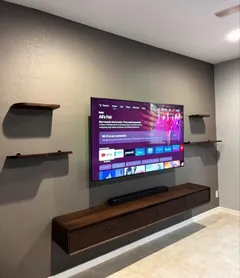
The two best spots are beside the TV — at the same height, vertically on a slim bracket — or just below it, horizontally or on a floating shelf together with a soundbar. Both keep the HDMI cable short enough to be hidden completely.

We avoid putting a console directly above the TV: warm air rises off the panel, and the console would be breathing it in. We also make sure you can reach the power button and disc slot without taking anything apart.

Ventilation: the part that matters

Modern consoles move a lot of heat. The PS5 pulls air in at the front and sides and exhausts at the back; the Xbox Series X pulls from the bottom and exhausts from the top. Mount one with its vents blocked, and it gets loud, throttles and wears out faster.

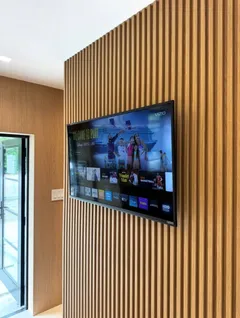
We use brackets designed for your console that hold it by the edges or base, and leave clearance around every vent — including between the console and the wall. If you're mounting on a feature wall with slat panels, we keep the console proud of the panels so it isn't breathing through felt.

Rather have a pro do it?

Send a request — we'll confirm the exact price and a time that suits you by text or call. 3-year warranty on every install.

Call (877) 676-8880

Cables and connection

The console should go into the TV's best HDMI port — the one labeled 4K/120 Hz or HDMI 2.1 on newer TVs — for the full frame rate and features like VRR. We connect it there, set the TV's game mode, and route the HDMI and power cables with the TV's: inside the wall to the lower plate, or in the same raceway. See TV cable concealment and hiding HDMI and power cables.

If you also have a soundbar, the console's audio goes through the TV to the soundbar over HDMI ARC or eARC — see soundbar installation.

Console mounting in our regions

We mount consoles in Miami, Los Angeles, Dallas, Las Vegas, Houston, Atlanta, Chicago, San Diego, Charlotte, Salt Lake City, Seattle and Raleigh–Durham, usually on the same visit as the TV. Same prices and same-day slots in every region, 3-year warranty.
How it works

How we mount your game console

  1. Step 1

    Confirm the model and bracket

    Tell us the console when you book; we bring a matching bracket or use the one you bought.

  2. Step 2

    Choose the spot

    We agree on the position next to or under the TV, keeping vents clear and the disc slot and buttons reachable.

  3. Step 3

    Anchor the bracket

    The bracket is leveled and anchored into studs or masonry, not into drywall alone.

  4. Step 4

    Mount and connect

    The console goes on the bracket, and HDMI and power are routed with the TV's cables.

  5. Step 5

    Test the picture

    We boot the console, set the HDMI port and picture mode for gaming, and check the cables are tidy.

Pricing

Game Console Mounting pricing

ServicePrice
PlayStation mounting$69
Up to 60"$119
61–85"$129
External (cable raceway)$39
Internal (inside the wall)$69
TV stand$79–$149

Console mounting is $69 per console, added to a TV installation. Want the console on a shelf instead? A floating shelf or media stand is $79–$149.

Full price list →
Where we work

Game Console Mounting in every region we serve

The same crews, the same flat price list and the same 3-year warranty in every region — and no travel fee anywhere inside the service area.

Related guides from our blog

Wire Management

How to Hide HDMI and Power Cables Behind a Mounted TV

Three methods that actually work — in-wall kit, paintable raceway, furniture routing — plus the HDMI details people miss: in-wall ratings, length, eARC for soundbars and 2.1 for consoles.

2 min read
Installation Tips

How to Hide TV Wires In the Wall (In-Wall Cable Concealment Guide)

The code-compliant way to run TV cables inside a wall: in-wall power relocation kits, why extension cords are not allowed, fire blocks, and what to do on concrete and block walls.

3 min read
Special Installations

Soundbar and Floating Shelf Installation Under a Wall-Mounted TV in Miami

Mounting a soundbar and a floating shelf under a wall TV: spacing, brackets that attach to the TV vs the wall, shelves on concrete block, hiding the cables for three devices and what it costs in Miami.

2 min read
Product Guides

What Is the Best TV Wall Mount? Installer's Picks by Size and Use Case (2026)

The mount types we actually install, by room and TV size: slim fixed mounts, tilting mounts for bedrooms and fireplaces, full-motion arms for corners, pull-downs and heavy-duty mounts for 85-inch-plus screens.

2 min read
DIY Guides

How to Mount a TV: Step-by-Step Guide for Every Wall Type

The same eight steps we follow on every job — drywall, concrete block, poured concrete, metal studs, plaster and brick. What changes from wall to wall is the anchor, not the process.

6 min read
Product Guides

What Size TV Can You Mount on a Wall? Size, Weight and Wall Limits

Almost any size — if the wall and anchors match. How big a TV each wall type holds, how to size the TV to the wall and the room, and the checks for 85 and 98-inch screens.

2 min read

Free planning tools

Game Console Mounting: frequently asked questions

How much does it cost to mount a PS5 or Xbox on the wall?
$69 per console, added to your TV installation. Hiding the console's cables with the TV's is part of the concealment price: $39 for a raceway or $69 in the wall.
Is it safe to mount a console on the wall? Won't it overheat?
Yes, when the vents stay clear. We use brackets that hold the console by its edges or base, keep several inches of space around the intake and exhaust, and keep it out of the hot air rising off the TV.
Which consoles can you mount?
PlayStation 5 (standard and slim), Xbox Series X and Series S, Nintendo Switch docks, and most streaming boxes. Tell us the model when you book so we bring the right bracket.
Where is the best place for the console?
Beside or just below the TV, so the HDMI cable is short and you can reach the power button and disc slot. We avoid placing it directly above the TV, where heat collects.
Can you mount the controllers or chargers too?
Yes — we can add a small controller holder or charging dock next to the console and run its power with the rest.

What customers say

★★★★★

"Mounted a 75" above the fireplace and hid every cable. Showed up on time, done in about an hour, left the room cleaner than they found it."

— Daniel R.
★★★★★

"Got the price online in a minute, booked for the same afternoon. Exactly the number I was quoted, no surprises."

— Maria G.
★★★★★

"Three TVs, two wall types, one visit. The full-motion mount in the kitchen corner was a great call."

— Kevin P.