Mon–Sun 8am–8pm Same-day service · Flat-rate pricing

Media Wall Installation — Multiple TVs Joined Into One Big Screen

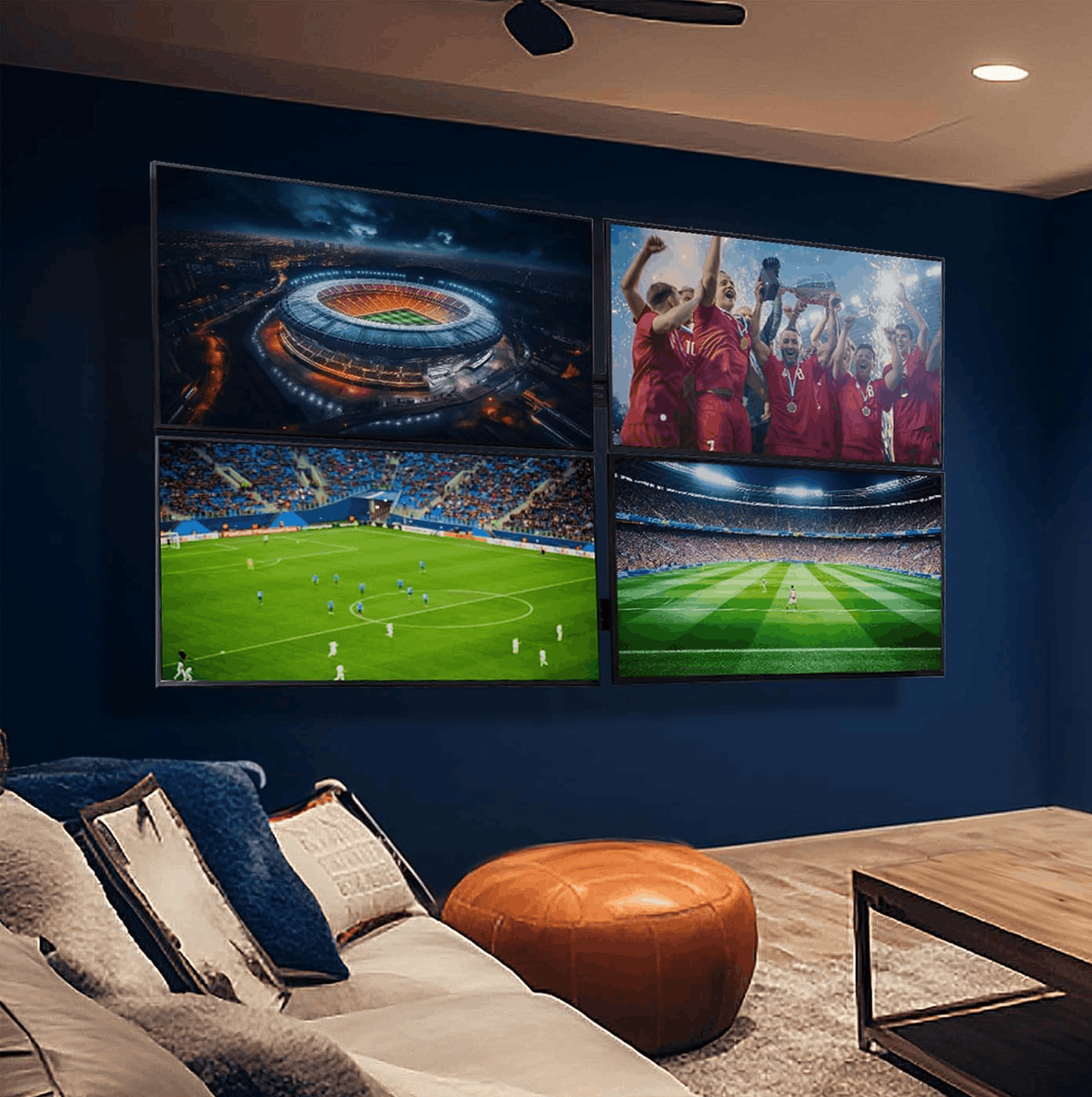
A media wall joins several TVs into one giant screen — four in a 2×2 grid, or two side by side or stacked, in landscape or portrait. It takes special video wall mounts that line the screens up to the millimeter and a controller box that splits one picture across all of them. We plan it, source the hardware, install, align and calibrate it.

Why homeowners book us

  • Any layout — 2×2, 2×1 or 1×2, landscape or portrait
  • Video wall mounts with micro-adjustment, so the seams line up perfectly
  • Sync controller that turns every screen into one picture — or shows different sources
  • Structure and power planned for the combined weight and load
  • One crew, one warranty — mounting, wiring and setup covered for 3 years
Call (877) 676-8880
★★★★★ 4.9★ from 480+ reviews 3-year workmanship warranty Crews in 12 US metros

Submit a request

Tell us about your TV and the wall — we'll confirm the exact price and a time that works for you by text or call.

What you get

What goes into a media wall installation

A media wall is not four TV installs next to each other. These are the parts that make several screens behave like one.

Media Wall Install — a TV Mount Q installation

Layout planned to the inch

2×2, 2×1 or 1×2, landscape or portrait: we work out the total size, the center height and where every panel lands on the wall.

Video wall mounts

Rail-based mounts with push-in/pop-out and X/Y/Z micro-adjustment, anchored across studs or masonry for the combined weight.

Sync controller box

A video wall controller takes one HDMI source and splits, scales and synchronizes it across every screen, with bezel compensation.

Alignment and calibration

Seams aligned to the millimeter, brightness and color matched panel to panel, so the image reads as one screen.

Power and signal done right

Every screen gets power and HDMI hidden in the wall or a raceway; long runs use extenders so the signal stays clean.

In this article
  1. What a media wall is
  2. Layouts: 2×2, 2×1 and 1×2, landscape or portrait
  3. Choosing the screens
  4. Video wall mounts: why regular brackets don't work
  5. The sync box: a video wall controller
  6. Power, signal and hidden wiring
  7. Alignment and calibration
  8. Media walls for homes and businesses
  9. Media wall installation in our regions

What a media wall is

A media wall — the industry term is video wall — is several TVs or displays mounted edge to edge and driven as one screen. Instead of one 85-inch TV, you get a picture the size of four 55- or 65-inch screens together, at a fraction of the price of a single giant display.

People build them for very different reasons: a game room or home theater that wants a truly huge picture, a sports lounge that shows the game across the whole wall, a restaurant or shop with menu boards and promotions, an office lobby, a church, a showroom. What they all have in common is that the screens have to line up perfectly and behave like one — and that's where a media wall differs from simply mounting several TVs next to each other.

Layouts: 2×2, 2×1 and 1×2, landscape or portrait

The layout decides the shape of the picture:

LayoutScreensShape of the picture
2×2, landscape416:9 — the same shape as one TV, twice as wide and tall
2×1, landscape (side by side)232:9 — ultra-wide, great for panoramic content and dashboards
1×2, landscape (stacked)216:18 — almost square
2×1, portrait218:16 — almost square, with a vertical seam
1×2, portrait (stacked)29:32 — a tall column for menus, art and signage
2×2, portrait49:16 — a big vertical screen

The 2×2 landscape wall is the most common because regular video fills it with no black bars: four 55-inch screens make a picture roughly equal to a 110-inch TV. The two-screen layouts are the entry point — less hardware and a smaller wall — and portrait orientation is the go-to for signage and menu boards. Use the TV size calculator with your seating distance to see how big the finished wall should be.

Choosing the screens

Every screen in a media wall should be the same model, ideally bought together from the same batch: panels from different production runs can differ slightly in color and brightness, and on a wall where they touch, you'll see it.

There are two classes of screens:

  • Consumer TVs — the budget route and perfectly good for homes and game rooms. Their frames (bezels) show as thin lines between screens; slimmer bezels mean less visible seams.
  • Commercial video wall displays — built for this job, with ultra-narrow bezels of a few millimeters, higher brightness, 24/7 ratings and a built-in video wall mode that can pass the signal from screen to screen. They cost more, which is why they're the standard in businesses.

Check each screen's VESA pattern and weight when choosing mounts — see understanding VESA patterns.

Rather have a pro do it?

Send a request — we'll confirm the exact price and a time that suits you by text or call. 3-year warranty on every install.

Call (877) 676-8880

Video wall mounts: why regular brackets don't work

A regular fixed bracket gets a TV level to within a millimeter or two — fine for one screen, clearly visible when two screens touch. Video wall mounts are built to close that gap:

  • Rail systems. Horizontal rails are leveled and anchored across the wall first; each screen's mount hangs on the rails and slides into exact position.
  • Micro-adjustment. Each mount adjusts on X, Y and Z — side to side, up and down, and in and out — so the edges of neighboring screens can be matched to the millimeter.
  • Push-in / pop-out. Press a screen and it pops forward on a spring, giving access to the ports and cables behind it without taking anything apart. Essential for servicing a wall that's edge to edge.
  • Portrait adapters for vertical layouts, with the screen's cooling vents still facing the right way.

The combined weight is the other reason for special hardware: four 65-inch screens plus mounts can be 250 lb or more. Rails spread that load across every stud they cross, or across masonry anchors on concrete — see how we mount on concrete and toggle bolts versus lag bolts for metal studs and drywall.

The sync box: a video wall controller

Plug four TVs into four HDMI outputs and you get four copies of the same picture — not one big one. To make them act as a single screen, a media wall needs a video wall controller (often called a video wall processor or sync box):

  • It takes one HDMI source — a streaming box, console, cable box or PC — and splits, scales and synchronizes it so each screen shows its own part of the picture, frame-accurate.
  • It supports the layouts above, including rotation for portrait screens.
  • It applies bezel compensation: the picture "skips" the width of the frames, so a straight line crossing a seam stays straight instead of jumping.
  • Many controllers can also switch to independent mode — a different source on each screen, which is how sports lounges show several games at once — or to preset mixes.

Commercial displays with a built-in video wall mode can do the splitting themselves by passing the signal from screen to screen, so a separate box isn't always needed. We'll recommend the right option for your screens and your content.

Power, signal and hidden wiring

Every screen needs its own power and HDMI, plus the controller's cabling — a lot of wiring for one wall, and none of it should be visible. We run it inside the wall to recessed plates behind the screens where the wall allows, or in a paintable raceway on concrete and brick; see TV cable concealment and hiding HDMI and power cables.

Two details matter more than on a single TV:

  • Power load. Several large screens on one outlet can add up; we check the circuit and use a surge-protected power setup. If a new circuit is needed, we'll tell you exactly what an electrician should add.
  • Signal distance. When the controller and sources sit in a rack or closet away from the wall, long HDMI runs lose signal. We use HDMI-over-Cat6 extenders so the picture stays clean at any distance.
Free tools Wire Hiding Kit Builder A complete parts list for both routes — inside the wall or a paintable raceway — with the right cable length for your run. Open the tool →

Alignment and calibration

The last step is what makes the wall read as one screen. With every screen connected, we micro-adjust the mounts until the seams are straight and even, then set the layout and bezel compensation in the controller. Finally we match the picture: brightness, color temperature and picture mode are set the same on every panel so the image doesn't change tone from one screen to the next.

If you're pairing the wall with sound, a soundbar under the center of the wall or a separate audio system keeps the sound anchored to the middle of the picture. Replacing a single TV with a media wall? We take the old one down as part of the job — see TV removal.

Media walls for homes and businesses

We install media walls in homes — game rooms, basements, home theaters — and in businesses: restaurants and bars, lobbies, showrooms and offices. For menu boards and signage, see our article on digital menu board and signage installation.

Media wall installation in our regions

We build media walls in Miami and South Florida, Los Angeles, Dallas–Fort Worth, Las Vegas, Houston, Atlanta, Chicago, San Diego, Charlotte, Salt Lake City, Seattle and Raleigh–Durham. Concrete condo walls, metal studs in commercial spaces, framed walls in homes — the plan changes with the wall, and we'll tell you up front what your wall can carry. If you only need one TV on the wall, see TV wall mounting.
How it works

How a media wall project runs

  1. Step 1

    Tell us the wall and the goal

    Send photos and measurements of the wall, the layout you have in mind (2×2, 2×1 or 1×2) and what you'll show on it.

  2. Step 2

    Plan the layout and hardware

    We confirm screen size and model, orientation, total dimensions, mounts, controller, power and cable routes, and give you a fixed quote.

  3. Step 3

    Install rails and power

    The mounting rails are leveled and anchored into studs or masonry, and power and HDMI are run to every screen position.

  4. Step 4

    Hang, align and connect

    Screens go onto the video wall mounts, the seams are micro-adjusted until they line up, and every screen is connected to the controller.

  5. Step 5

    Calibrate and hand over

    We set the layout in the controller, compensate for bezels, match brightness and color, and show you how to switch sources.

Pricing

Media Wall Install pricing

ServicePrice
Internal (inside the wall)$69
External (cable raceway)$39
TV dismount$49
Soundbar installation$69

Every media wall is different — number and size of screens, orientation, controller and wall — so we quote it per project after seeing the wall and your plan. The rows above are standard prices for the extras that often go with it: hiding each screen's wiring, taking down an existing TV and mounting a soundbar.

Full price list →
Where we work

Media Wall Install in every region we serve

The same crews, the same flat price list and the same 3-year warranty in every region — and no travel fee anywhere inside the service area.

Related guides from our blog

Special Installations

Commercial Menu Board & Digital Signage Installation in Miami

Mounting menu-board TVs, lobby displays and gym screens for Miami businesses: rows of perfectly aligned screens, concrete and metal-stud walls, after-hours installs, cable management and insurance paperwork.

2 min read
Wire Management

How to Hide HDMI and Power Cables Behind a Mounted TV

Three methods that actually work — in-wall kit, paintable raceway, furniture routing — plus the HDMI details people miss: in-wall ratings, length, eARC for soundbars and 2.1 for consoles.

2 min read
Installation Tips

How to Hide TV Wires In the Wall (In-Wall Cable Concealment Guide)

The code-compliant way to run TV cables inside a wall: in-wall power relocation kits, why extension cords are not allowed, fire blocks, and what to do on concrete and block walls.

3 min read
Installation Tips

Toggle Bolts vs Lag Bolts for a TV Mount: Sizes by Wall Type

Wood stud: 5/16 or 3/8-inch lag bolts. Metal stud: 1/4-inch snap-toggles through the steel. Concrete and brick: 3/16-inch Tapcons or 3/8-inch sleeve anchors. Drywall only: toggles, small TVs only.

2 min read
DIY Guides

How to Mount a TV on Concrete or Brick: Tapcon Sizes and Steps

Under 75 inches: 3/16-inch Tapcons or 3/8-inch sleeve anchors into solid concrete, block or brick. Bigger screens and full-motion arms need more anchors. Hollow block, furring strips and the steps, from an installer who drills block every week.

4 min read
Product Guides

VESA Size Chart by TV Size, Screw Sizes and How to Check Your TV

Typical VESA patterns for 2024–2026 TVs: 43–50 inches mostly 200×200, 55 inches often 300×200 or 300×300, 65 inches 400×300, 75 inches 400×400, 85 inches mostly 600×400 — plus M6/M8 screws and how to measure yours.

2 min read

Free planning tools

Media Wall Install: frequently asked questions

What is a media wall?
A media wall — also called a video wall — is several TVs or displays mounted edge to edge and synchronized so they show one large picture. The most common layout is four screens in a 2×2 grid; two screens side by side (2×1) or stacked (1×2) are popular too, in landscape or portrait.
What equipment does a media wall need?
Three things beyond the TVs: video wall mounts that let each screen be micro-adjusted so the seams line up, a video wall controller (a sync box) that splits one HDMI signal across all screens, and a power and cable plan for every screen. Commercial video wall displays can also daisy-chain the signal without a separate box.
How much does a media wall cost?
It depends on the number and size of screens, the mounts, the controller and the wall, so we quote each project. Hiding each screen's wiring is $69 in the wall or $39 in a raceway, and taking down an existing TV is $49.
Can I use regular TVs, or do I need special displays?
Regular TVs work, and they're the budget choice for homes and game rooms — you'll see the frames as thin lines between screens. Commercial video wall displays have ultra-narrow bezels (a few millimeters) and built-in wall modes, which is why businesses use them. Either way, all screens should be the same model, ideally from the same batch, so colors match.
Can the TVs be mounted vertically?
Yes. Any layout can be landscape or portrait — two portrait screens side by side make a near-square wall, and a 1×2 portrait stack makes a tall column that works well for menus, art and signage. The controller rotates the picture to match.
How long does a media wall installation take?
Usually one day for a 2×1 or 1×2 wall and one to two days for a 2×2, depending on the wall, the wiring and calibration. Hardware is ordered after the plan is confirmed.

What customers say

★★★★★

"Mounted a 75" above the fireplace and hid every cable. Showed up on time, done in about an hour, left the room cleaner than they found it."

— Daniel R.
★★★★★

"Got the price online in a minute, booked for the same afternoon. Exactly the number I was quoted, no surprises."

— Maria G.
★★★★★

"Three TVs, two wall types, one visit. The full-motion mount in the kitchen corner was a great call."

— Kevin P.

Plan your media wall with us

Send a request with a photo of the wall, the layout and the screens you have in mind — we'll come back with options and a quote.

(877) 676-8880